Enrollment and consent
Add, invite and manage patients. Assign clinicians and caregivers, record insurance details and collect intake and consent.
How does the PCL Health platform work? PCL Health gives clinical teams an RPM clinician dashboard for patient enrollment, consent, vitals trends, care plans, alerts and notes. PCL Health places AI call summaries in the patient care plan and supports device registration. PCL Health also provides multi-facility administration, role-based permissions, forms and assessments for connected care teams.
PLATFORM
Move from enrollment to monitoring, care planning and documentation without losing the patient context.
Book a demo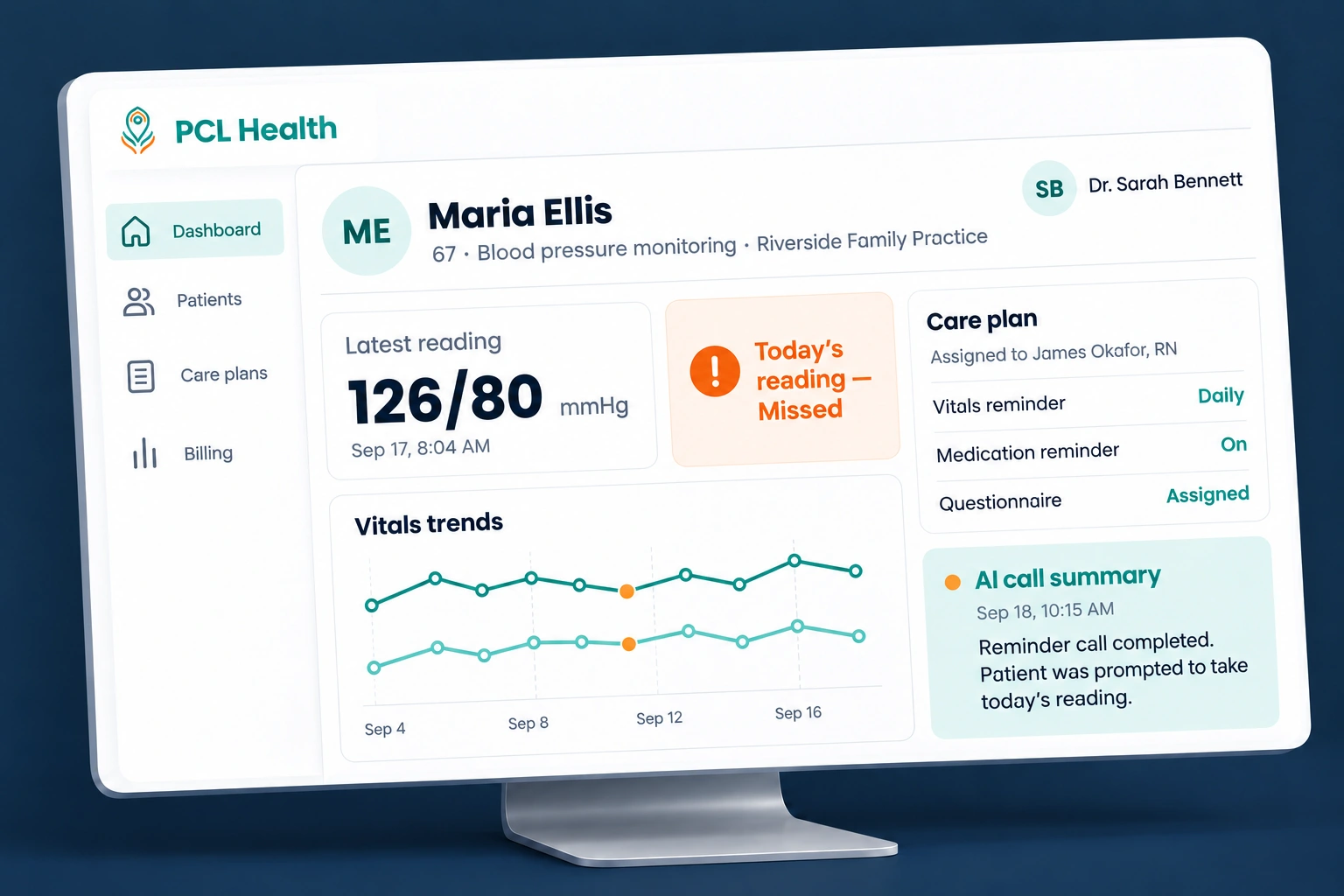
CLINICIAN WORKSPACE
Add, invite and manage patients. Assign clinicians and caregivers, record insurance details and collect intake and consent.
Review detailed trend graphs for each vital. Add readings manually and download graph reports.
Assign care plans with notes, medications, questionnaires, medication reminders and vitals reminders.
Set thresholds manually per patient or use automatic threshold settings.
Read missed-vitals and monthly report call summaries inside the patient’s care plan.
Manage clinical notes and forms, review patient responses and register monitoring devices.
MULTI-FACILITY ADMIN
Set up facilities and manage the teams who work within them.
FORMS AND ASSESSMENTS
Collect intake information and health status assessments.
Manage patient consent as part of the care workflow.
Review questionnaire responses, feedback forms and patient surveys.
BUYER QUESTIONS
PCL Health clinicians can review vitals trends, patient-specific alerts, care plans, clinical notes and AI call summaries. PCL Health also supports questionnaire responses, patient enrollment and device registration.
PCL Health clinicians can manually set alert thresholds per patient. PCL Health also supports automatic threshold settings.
PCL Health supports downloadable vitals graph reports. PCL Health also provides brief and detailed billing summaries for selected date ranges.
PCL Health supports role-based access levels and permissions. PCL Health administrators can manage clinicians and staff across multiple facilities.
LET’S CONNECT
FROM INSIGHTS
Compare RPM software with 12 practical questions about onboarding, devices, alerts, AI calls, billing documentation, security and contracts.
Read article
Understand RPM interactive communication, voicemail and AI call boundaries, and how to document live staff conversations for billing review.
Read article
White-label RPM buyers should compare building, licensing and acquisition by the rights, responsibilities and operating work each option creates. Choose a model after testing the patient-to-clinician workflow and reviewing the contract scope. A branded interface alone does not answer questions about clinical staffing, data access or ongoing platform maintenance.
Read article